

🚀 Shipping Real Code with Opencode: Implementing Agentic AI in Software Delivery
“Moving beyond vibe coding: disciplined AI collaboration in software engineering”

Introduction
Over the past year, I’ve experimented with nearly every flavor of “AI coding assistant” I could get my hands on. Tools like Aider, Cline, Roo, and Kilo Code each offered something useful:
Aider → integrates with your editor and indexes code effectively.
Kilo Code → works smoothly with VS Code, making it easy to track changes.
Cline and Roo → explored different takes but didn’t quite fit my workflow.
I even tried replicating the setup in Neovim with codecompanion.nvim (as a lifelong Vim user), but it didn’t click. Other tools like Claude Code showed promise, but they didn’t integrate well into my environment, where I rely heavily on OpenRouter for closed-source models and Chutes for open-source ones.
Then I discovered Opencode. It shifted my entire perspective on AI-assisted software delivery.
Unlike many tools that reduce to “chatting with your repo,” Opencode is a framework for structured, agentic workflows. It enables:
✅ Parallel tracks for research, planning, and building
✅ Project-specific knowledge bases
✅ Guardrails to keep LLMs from drifting off course
Backed by an active community and rapid iteration, Opencode has become my preferred way of working.
What This Guide Covers
This isn’t another “AI makes you 10x faster” pitch. LLMs won’t replace engineers—but they can amplify productivity when paired with strong practices. Used correctly, they help teams:
Reduce time spent on boilerplate
Improve specs and documentation
Free up human engineers for design, validation, and decision-making
The point is simple: in the AI era, good engineering practices matter more than ever. Without tests, specs, and reviews, AI output just adds noise. With them, AI becomes a powerful accelerator.
Why Share This?
The hype term vibe coding—just letting an LLM run free—might work for experiments, spikes, or prototypes. But in production, it’s dangerous.
Exploration: POCs and experiments can tolerate loose workflows.
Delivery: Production software requires specs, reviews, and tests.
Software engineering has always had standards. A weekend hack isn’t production-ready code. Precision, context, and intent make the difference:
❌ Weak: “Fix this problem.”
✅ Strong: “The valuexyzis hardcoded. Refactor it to be dynamically built based on environment variables.”
Precision reduces friction, saves tokens, and makes AI an effective partner instead of a liability.
🧩 Agentic Workflow – Core Foundations
Agentic workflows only work when built on solid engineering discipline. This isn’t about letting AI code unchecked—it’s about using AI where it creates leverage: speeding up repetitive work, assisting with research, and enabling structured human-AI collaboration.
Because this field is still maturing, teams should define workflows, gather feedback, and iterate carefully.
Developer Mindset
Engineering is more than typing code:
Writing code is work-intensive but not the main value driver.
Code is the byproduct of thinking through solutions and system design.
Activities like debugging, refactoring, and validating correctness remain critical.
LLMs fit naturally here:
Code completion and scaffolding
Acting as a broad knowledge base
Automating repetitive steps
Humans remain in charge.
👉 No vibe coding. Collaboration must be structured, intentional, and reviewed.
🔄 The Core Process
Autocomplete is useful, but the real power comes from agent workflows—splitting work into steps that LLMs can handle in structured contexts.

Research → collect references, diagrams, and system insights.
Spec Mode → create detailed plans; update when drift occurs.
Build → generate code from specs, validate output.
Code Review → reviewer agents + tagged commits.
Finalize → accept, PR, merge after validation.
The Opencode Workflow
Opencode (open-source, provider-agnostic) makes this workflow concrete, but the same principles apply to other tools like GitHub Copilot or Kilocode. The key is not the tool—it’s the process, prompts, and shared rules.
Setup
Authenticate with your provider:
opencode auth loginOnce logged in, you can use available models for structured workflows.
Global Project Rules
Maintain shared agent rules for consistency:
Global rules file (
AGENTS.md) – reused across repositories.Project rules files – repo-specific extensions.
Link your global rules into other tools when possible (e.g., Copilot or Kilocode).
The goal: consistency, shared learning, and iterative refinement.
Agents
Agents are specialized workflows packaged as prompts.
Examples include:
Spec Mode – produces detailed implementation plans.
Test writers.
Strong prompting and well-defined agents = strong results.
Knowledge Base
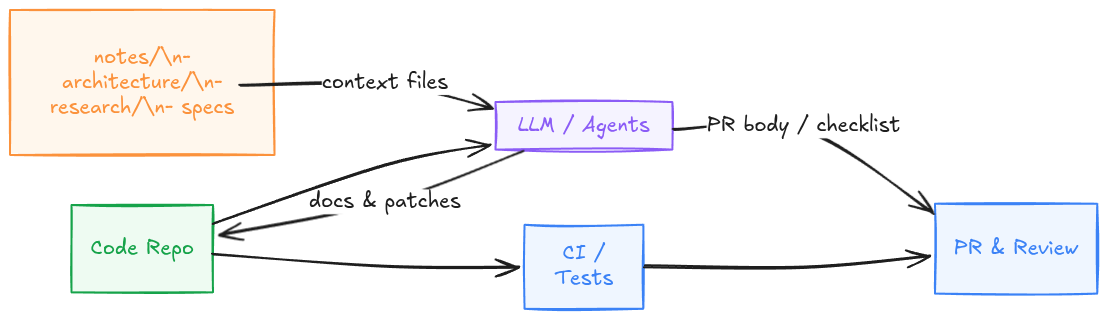
Every repository should include a Git-backed notes/ folder. This extends the LLM’s memory with design decisions, research, and specs.
Example Setup
git clone <repo-url>/llm-notes ~/Code/notes/project/notes
ln -nfs ~/Code/notes/project/notes ./notes
echo "notes" >> .git/info/exclude
echo '\!notes' >> .rgignore
This keeps project knowledge:
Organized per repo.
Shared and versioned.
Usable across LLM sessions.
Development Workflow in Practice
Your notes/ folder connects directly to the workflow:
❯ tree
.
├── project
│   └── notes
│       ├── architecture/
│       ├── research/
│       └── specs/
1. Research
Gather references, diagrams, and system insights.
Save structured findings in
notes/research/.
2. Spec Mode
Use spec agents to create detailed plans.
If AI output drifts, update the spec and restart.
3. Build
Generate code based on specs.
Engineer validates output.
Stop and adjust specs if the AI strays.
4. Code Review
Use reviewer agents.
Tag commits for transparency:
[AI] feat/1234: add Redis caching to GET /users/{id}
[Human] test/1234: extend integration tests for RBAC roles
5. Finalization
Accept reviewed code.
Open a PR.
Merge after validation and tests.
Tips for Better AI Results
Hidden assumptions
Be precise:
Bad →Add caching
Good →Add Redis caching with TTL=5m, stampede protection, and metricsAvoid corrections mid-build: encode rules in configs like
AGENTS.md.Start small: pilot one project, gather feedback, iterate.
This is not perfect—yet. But used consistently, refined, and shared, agentic workflows will mature into a competitive advantage for any engineering team.
⚠️ Final reminder: LLMs assist, but humans decide. You remain responsible for quality, tests, and final decisions.
Conclusion & Next Steps
Implementing a structured workflow grounded in strong development practices is essential for making AI a reliable contributor to software delivery. The same principles that apply when mentoring junior developers—providing detailed specifications, guiding solution design, and enforcing review discipline—apply equally to large language models. The difference is that with LLMs, this structure and rigor become even more critical to ensure consistency, quality, and trustworthiness.
Looking Ahead
In upcoming articles, I will explore:
🔀 Parallelizing implementations with Git worktrees
🔍 Integrating automated code review into the CI/CD pipeline
🛠️ Tools versus MCPs: understanding their roles and determining when MCPs add value
The code review step is where I've been spending most of my time lately. A single reviewer agent trying to catch accessibility issues, N+1 queries, and missing health checks in the same pass doesn't do any of them well. Splitting by domain with separate specialist agents per file type sorted it. Covered the setup here for OpenCode specifically: https://reading.sh/one-reviewer-three-lenses-building-a-multi-agent-code-review-system-with-opencode-21ceb28dde10